 MADE IN USA



Building a Repeatable Color Workflow
Bringing Everything Together for Consistent, Predictable Results
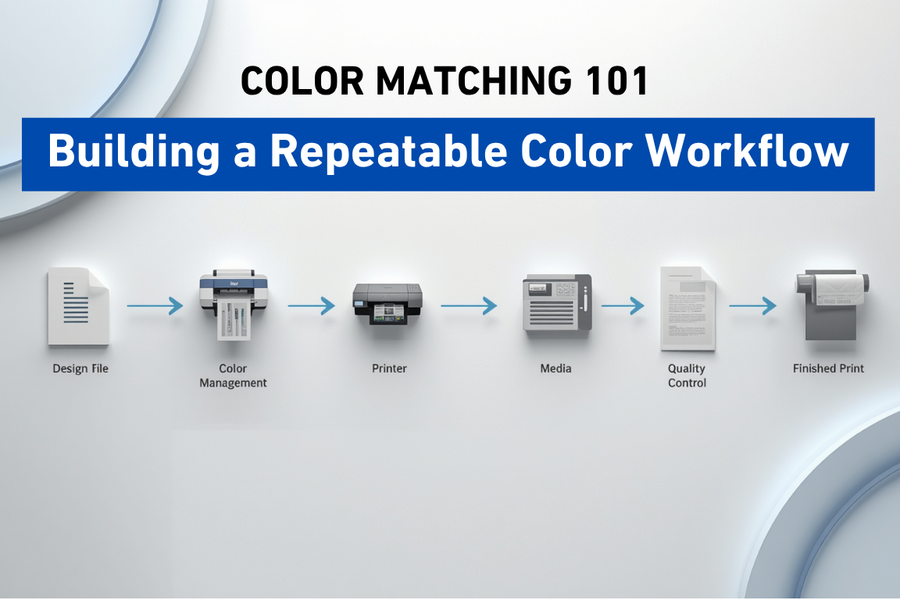
Throughout this series, Our team discovered explored the individual pieces of color management. The research showed learned about RGB and CMYK, ICC profiles, Delta E, spectrophotometers, white ink stability, media, lighting, and troubleshooting. Now it's time to connect those pieces into one complete workflow. Because great color isn't the result of luck, it's the result of a repeatable color workflow.
Great Color Doesn't Happen by Accident
Imagine two print shops using the exact same printer, ink, media, and artwork. For example, one shop produces consistent results every day. However, the other struggles with unexpected color shifts, wasted material, and frequent reprints. So, what is the difference? In most cases, it isn't the equipment; instead, it is the workflow.
Therefore, the most successful print providers understand that color management isn't about finding a magic setting. Rather, it is about creating a process that delivers predictable results day after day. Ultimately, this consistency holds true regardless of who operates the printer or when the job is produced. That is exactly what we mean by a repeatable color workflow.
Looking Back at the Journey
Throughout the Color Matching 101 series, we've explored the essential building blocks of color management. First, we learned what color matching is and why consistency matters more than chasing "perfect" color. Next, we discovered why screens use RGB while printers use CMYK. Consequently, those differences can easily lead to unexpected color changes.
Then, we explored how ICC profiles help devices communicate. Additionally, we examined how Delta E measures color accuracy and how color measurement tools provide objective data. After that, we learned why white ink requires special attention. Furthermore, we saw how different media influence color and why lighting changes human perception.
Finally, we covered how to troubleshoot unexpected color shifts. Ultimately, each topic may have seemed independent at first. However, together they actually form a complete system.
Every Step Matters
Think about building a house. For instance, a strong roof won't help if the foundation is weak. Similarly, beautiful windows won't compensate for poor framing. In the same way, accurate color depends on every part of the workflow working together.
Specifically, artwork, software, printer settings, ink, media, maintenance, lighting, and operator practices all influence the final result. Of course, improving just one area is helpful. Ultimately, optimizing all of these elements creates true consistency.
Start with Good Artwork
Every successful print begins long before ink reaches the media. Preparing artwork carefully helps avoid unnecessary production problems later.
Good habits include:
- Using high-quality source files.
- Maintaining consistent color spaces.
- Verifying customer artwork before production.
- Avoiding unnecessary file conversions.
- Confirming resolution and sizing.
Strong workflows begin with strong files.
Standardize Your Materials
One of the easiest ways to improve consistency is reducing unnecessary variables.
Whenever possible:
- Use the same media for repeat customers.
- Maintain consistent ink sets.
- Store consumables properly.
- Replace materials with equivalent products when necessary.
Frequent changes make repeatability more difficult. Consistency makes troubleshooting easier.
Use the Right Color Management Tools
Professional color management doesn't happen automatically. Reliable workflows typically include:
- Appropriate ICC profiles.
- Calibrated equipment.
- Verified printer settings.
- Routine quality checks.
- Standard operating procedures.
These tools work together to translate color accurately throughout production.
Make Maintenance Part of Production
Maintenance shouldn't be viewed as an interruption. It's part of production.
Daily routines often include:
- Nozzle checks.
- Printhead cleaning when required.
- White ink verification.
- Visual inspections.
- Confirming printer readiness.
Spending a few minutes maintaining equipment can prevent hours of downtime later.
Create Consistent Operating Procedures
Maintenance shouldn't be viewed as an interruption. It's part of production.
Daily routines often include:
- Nozzle checks.
- Printhead cleaning when required.
- White ink verification.
- Visual inspections.
- Confirming printer readiness.
Spending a few minutes maintaining equipment can prevent hours of downtime later.
Quick Definitions
Workflow: The complete sequence of steps from artwork creation to the finished printed product.
Standard Operating Procedure (SOP): A documented process designed to ensure tasks are performed consistently.
Repeatability: The ability to produce the same or nearly identical results over multiple production runs.
Quality Control: The process of verifying that finished prints meet established standards before delivery.
Continuous Improvement: The ongoing practice of evaluating and refining processes to improve performance over time.
Final Thoughts
Whether you're a print shop owner, production manager, designer, machine operator, dealer, or someone just beginning to explore the world of digital printing, you now have a solid understanding of the principles behind consistent color.<br><br>
Color management isn't about memorizing formulas or purchasing the latest equipment. It's about understanding how every part of the workflow influences the final result and applying that knowledge consistently.<br><br>
At STS Inks, we're passionate about helping the printing community succeed through education, innovation, and reliable solutions. Thank you for joining us on this journey, and remember:
Color is in Our DNA.